这篇文章提出了一种名为 A-MEM 的主动式记忆系统,尝试解决现有 LLM 代理记忆系统结构僵化、适应性不足的问题。
- 传统方法(如 MemGPT、MemoryBank)依赖预定义的存储结构和固定操作流程,难以应对开放场景下的知识演化需求。
- A-MEM 借鉴了德国社会学家卢曼的卡片笔记法(Zettelkasten),通过动态索引、语义链接和自主进化机制,构建了可动态调整的知识网络。
- 每个记忆单元包含上下文描述、关键词、标签等多维度属性,新记忆的加入会触发历史记忆的上下文更新和关系重构。
- 实验表明,A-MEM 在长对话任务中的多跳推理准确率比现有方法提升 2 倍以上,同时将上下文长度缩减至传统方法的 15%。
链接:

研究背景和动机
- 研究问题:如何为 LLM Agent 设计一个灵活通用的记忆系统,以支持其与外部环境的长期交互?
- 问题起源:LLM 代理在长周期任务(如持续对话、复杂决策)中面临「记忆碎片化」挑战。现有系统如 MemGPT 的固定上下文窗口(~16k tokens)和 MemoryBank 的静态更新策略,导致知识组织僵化。
- 核心矛盾:预定义模式(如树状结构/图数据库)与开放场景知识演化需求的不匹配。例如,当代理学习新的数学解法时,现有系统无法自主创建跨学科连接。
相关研究对比
| 方法 | 核心机制 | 局限性 |
|---|---|---|
| MemGPT | 类操作系统的内存分层 | 固定大小的上下文窗口 |
| MemoryBank | 基于遗忘曲线的动态更新 | 缺乏跨记忆的语义关联 |
| Agentic RAG | 自主检索增强 | 知识库静态不可进化 |
| A-MEM | 动态链接 + 自主进化 | 解决了上述所有局限 |
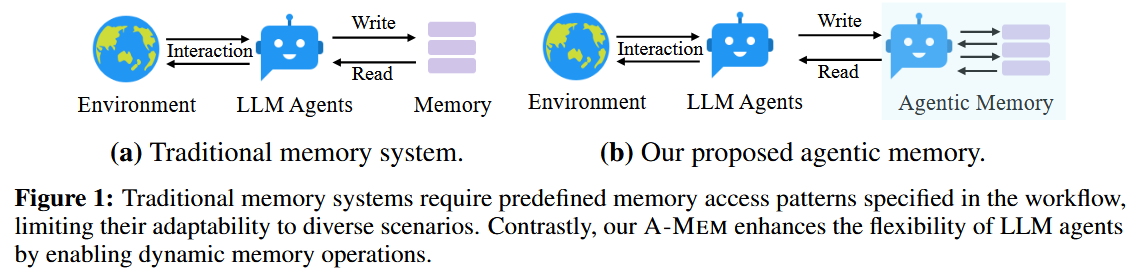
A-MEM 的核心思路是设计一个具有自主性的记忆系统,灵感来源于 Zettelkasten 方法,该方法通过原子笔记和灵活的链接机制创建相互连接的信息网络。
主要思想:
- 自主生成:LLM Agent 可以自主生成记忆的上下文描述,动态建立记忆连接,并根据新的经验智能演化现有记忆。
- 动态组织:无需预先确定记忆操作,实现动态的记忆结构。
- 持续演化:通过不断整合新的记忆,触发对现有记忆的更新,从而不断完善和加深对知识的理解。
方案
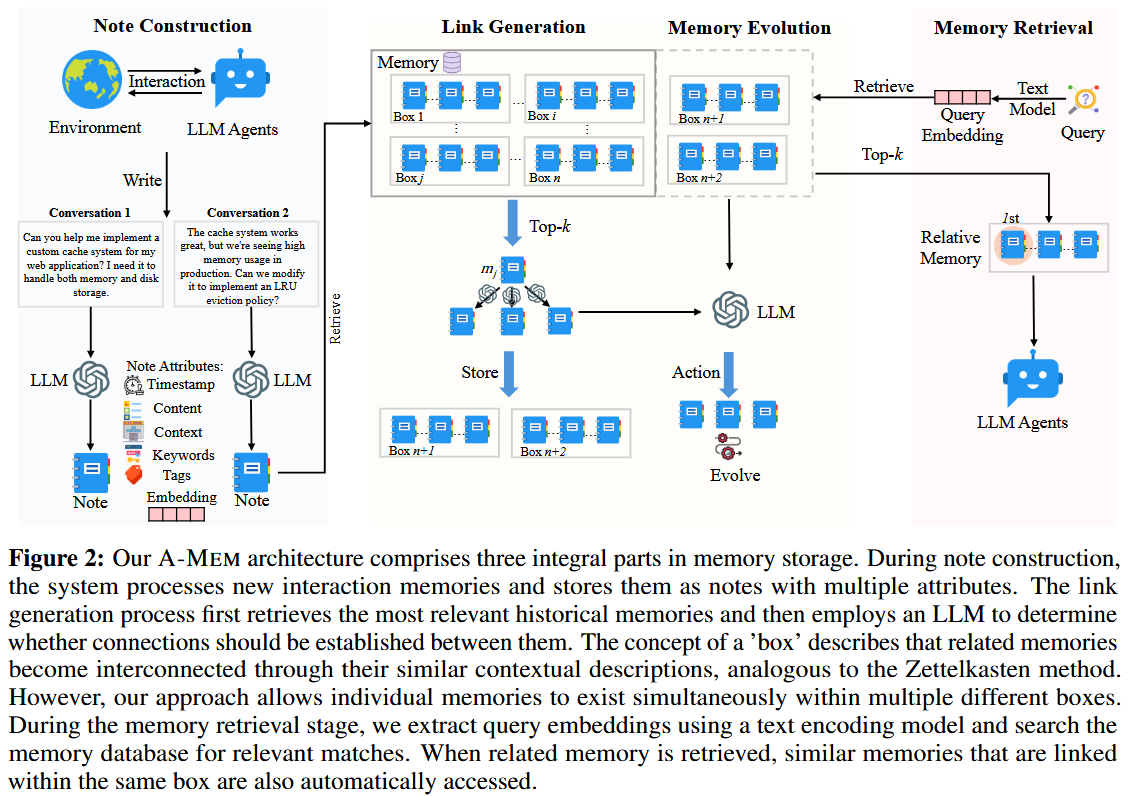
MemoryNote 构建
具有原子性,每个记忆单元记录独立概念。
每个记忆单元表示为:
:第 个记忆笔记。 :原始交互内容(content),例如对话文本、观察到的事件等。 :时间戳(timestamp),记录记忆发生的时间。 :LLM 生成的关键词(keywords),用于捕捉记忆的关键概念。 :LLM 生成的标签(tags),用于对记忆进行分类。 :LLM 生成的上下文描述(contextual description),提供丰富的语义理解。包含隐含语义,如「该解法与拓扑学存在潜在联系」。 :嵌入向量(embedding),用于相似度计算和检索。(⭐) :链接记忆集合(linked memories),包含与当前记忆相关的其他记忆。
首先由原始交互内容+时间戳+Prompt模板1输入给LLM,得到关键词+标签+上下文描述:
拼接原始交互内容+LLM生成的(关键词+标签+上下文描述)获得其密度向量表示:
通俗理解:我让LLM给原内容做笔记,让原内容等信息加上关键词、标签和上下文描述作为整一个笔记单元,然后把笔记单元向量化存储,以后找记忆就是找笔记。
实现:add_note
- 先调用
analyze_content(封装并调用 LLM,以结构化 JSON 返回 keywords/context/tags) - 再调用
add_document()— 将content + keywords + tags + context一并传入SentenceTransformerEmbeddingFunction,由 ChromaDB 自动完成向量化存储(即密度向量表示)。
动态链接生成
Note 通过(语义相似性 + LLM 推理)建立跨领域连接
- 相似性初筛:通过余弦相似度
筛选 Top-k 候选。 - 语义精修:LLM 分析候选记忆的深层关联(如因果关系、概念类比):$$L_i \leftarrow \operatorname{LLM}(m_n \parallel M_{near}^n \parallel P_{s2})$$
通俗理解:添加新笔记的过程中,我希望能理解各笔记之间的关系,我一方面根据语义表面(语义相似度)找与当前笔记有关的笔记,然后还是让LLM去读笔记分析,找到与当前笔记有语义深层次关系但我从语义表面上没有找到关联的,最终把相关笔记连接起来。
实现:
find_related_memories(query, k)— 调用 ChromaDB 向量检索,将 Top-k 结果(含 timestamp / content / context / keywords / tags)序列化为纯文本neighbors_text,作为的上下文注入 LLM process_memory()中strengthen动作分支 — LLM 在_evolution_system_prompt(即)的指引下,通过 suggested_connections字段返回应加入links的邻居 ID 列表
记忆自主进化
新记忆
例如,当学习「量子退火」后,系统自动将历史记忆「模拟退火算法」的标签更新为「优化算法
通俗理解:当我在学习过程中遇到新内容时,应该更新旧笔记内容,也还是让LLM去阅读笔记,找到需要更新的笔记,更新笔记(context,tag),也因此可能需要更新相关笔记连接。
实现:
process_memory()中update_neighbor动作分支 — LLM 以_evolution_system_prompt(即)为指引,返回 new_context_neighborhood和new_tags_neighborhood,系统据此原地更新邻居的context/tags
检索相关记忆
- 使用同MemoryNote一样的方式获得密度向量表示:
- 计算余弦相似度:
- 取最相关k个构造prompt:
论文里内容没有讲到检索时也将连接的笔记检索出来,但论文代码中是将表面语义相似的笔记及其连接的笔记作为学习参考。
实现:
search(query, k)/search_agentic(query, k)— 均调用ChromaRetriever.search(),由 ChromaDB 内部完成向量编码与余弦相似度排序,返回 Top-记忆。 search_agentic在此基础上额外展开每条结果的links,将链接邻居也并入返回集合,构造更丰富的上下文 Prompt。
代码
- 原代码:agiresearch/A-mem: A-MEM: Agentic Memory for LLM Agents
- 个人整理代码:Echo-Kang-hub/A-Mem: A-MEM: Agentic Memory for LLM Agents
伪代码(光速理解)
import torch
import torch.nn as nn
from sentence_transformers import SentenceTransformer
from sklearn.metrics.pairwise import cosine_similarity
from typing import List, Dict
import json
import numpy as np

class AgenticMemorySystem:
    def __init__(self):
        # 初始化文本编码器(使用sentence-transformers的all-MiniLM-L6-v2)
        self.encoder = SentenceTransformer('all-MiniLM-L6-v2')

        # 记忆库存储结构:列表存储记忆节点字典
        self.memory_bank = []

        # 超参数设置
        self.top_k = 10  # 相似记忆检索数量
        self.sim_threshold = 0.7  # 相似度阈值

    class MemoryNode:
        """记忆节点数据结构定义
        $$ m_i = \{c_i, t_i, K_i, G_i, X_i, e_i, L_i\} $$
        """
        def __init__(self, content: str, timestamp: float):
            self.content = content      # 原始交互内容 c_i
            self.timestamp = timestamp  # 时间戳 t_i
            self.keywords = []          # 关键词 K_i
            self.tags = []              # 分类标签 G_i
            self.context = ""           # 上下文描述 X_i
            self.embedding = None       # 嵌入向量 e_i
            self.links = []             # 链接记忆 L_i

    def _generate_note_components(self, content: str) -> Dict:
        """原子笔记构建模块(模拟LLM生成过程)
        论文公式:K_i, G_i, X_i ← LLM(c_i ‖ t_i ‖ P_{s1})
        """
        # 实际应用时替换为真实LLM调用
        return {
            "keywords": ["人工智能", "记忆系统", "神经网络"],
            "tags": ["技术", "机器学习", "认知科学"],
            "context": "该对话涉及人工智能记忆系统的技术原理及其在神经网络中的应用"
        }

    def _generate_links(self, new_node: MemoryNode, candidates: List[MemoryNode]) -> List[int]:
        """动态链接生成模块
        论文公式:L_i ← LLM(m_n ‖ M_{near}^n ‖ P_{s2})
        """
        # 基于语义相似度和规则模拟链接生成
        linked_ids = []
        for candidate in candidates:
            if len(linked_ids) >= 3:  # 最大链接数限制
                break
            if self._semantic_relationship(new_node, candidate):
                linked_ids.append(id(candidate))
        return linked_ids

    def _semantic_relationship(self, node_a: MemoryNode, node_b: MemoryNode) -> bool:
        """语义关系判断(模拟LLM推理过程)"""
        # 实际应用应使用LLM判断,这里用关键词重叠模拟
        common_keywords = set(node_a.keywords) & set(node_b.keywords)
        return len(common_keywords) >= 1

    def _update_memory_evolution(self, new_node: MemoryNode, linked_nodes: List[MemoryNode]):
        """记忆进化更新模块
        论文公式:m_j^* ← LLM(m_n ‖ M_{near}^n \ m_j ‖ m_j ‖ P_{s3})
        """
        for old_node in linked_nodes:
            # 合并关键词(去重)
            combined_keywords = list(set(old_node.keywords + new_node.keywords))

            # 更新上下文描述
            old_node.context = f"{old_node.context} | 关联更新:{new_node.context[:50]}…"

            # 更新嵌入向量(加权平均)
            old_embed = old_node.embedding
            new_embed = new_node.embedding
            old_node.embedding = (old_embed * 0.7 + new_embed * 0.3) / (0.7 + 0.3)

    def add_memory(self, content: str):
        """添加新记忆的核心流程"""
        # 1. 创建基础记忆节点
        new_node = self.MemoryNode(
            content=content,
            timestamp=time.time()
        )

        # 2. 生成结构化属性(模拟LLM过程)
        components = self._generate_note_components(content)
        new_node.keywords = components["keywords"]
        new_node.tags = components["tags"]
        new_node.context = components["context"]

        # 3. 生成嵌入向量 e_i = f_enc[concat(c_i, K_i, G_i, X_i)]
        text_to_encode = f"{content} {' '.join(new_node.keywords)} {' '.join(new_node.tags)} {new_node.context}"
        new_node.embedding = self.encoder.encode(text_to_encode, convert_to_tensor=True)

        # 4. 相似记忆检索(余弦相似度计算)
        if self.memory_bank:
            embeddings = torch.stack([node.embedding for node in self.memory_bank])
            sim_scores = cosine_similarity(
                new_node.embedding.unsqueeze(0),
                embeddings
            )
            top_k_indices = sim_scores.argsort()[0][-self.top_k:]
            candidates = [self.memory_bank[i] for i in top_k_indices]
        else:
            candidates = []

        # 5. 动态链接生成
        new_node.links = self._generate_links(new_node, candidates)

        # 6. 记忆进化更新
        if candidates:
            self._update_memory_evolution(new_node, candidates)

        # 7. 存入记忆库
        self.memory_bank.append(new_node)

    def retrieve_memories(self, query: str, k: int = 5) -> List[MemoryNode]:
        """记忆检索模块
        论文公式:M_{retrieved} = {m_i | rank(s_{q,i}) ≤ k}
        """
        # 编码查询语句
        query_embed = self.encoder.encode(query, convert_to_tensor=True)

        # 计算相似度
        embeddings = torch.stack([node.embedding for node in self.memory_bank])
        sim_scores = cosine_similarity(
            query_embed.unsqueeze(0),
            embeddings
        )

        # 排序并返回Top-k结果
        top_k_indices = sim_scores.argsort()[0][-k:]
        return [self.memory_bank[i] for i in top_k_indices]

# 使用示例
if __name__ == "__main__":
    # 初始化记忆系统
    ams = AgenticMemorySystem()

    # 添加示例记忆
    ams.add_memory("论文提出了一种基于Zettelkasten的主动记忆系统")
    ams.add_memory("深度学习模型的记忆机制需要动态更新策略")

    # 检索相关记忆
    results = ams.retrieve_memories("人工智能记忆系统", k=2)
    for node in results:
        print(f"内容:{node.content[:50]}…")
        print(f"关键词:{node.keywords}")
        print(f"上下文:{node.context[:60]}…\n")
Project Structure
A-Mem/
 agentic_memory/           # 核心库
    __init__.py           # 包初始化与公开接口声明
    memory_system.py      # 核心记忆系统(MemoryNote + AgenticMemorySystem)
    llm_controller.py     # LLM 后端控制器(OpenAI / Ollama)
    retrievers.py         # ChromaDB 向量检索器(普通 / 持久化 / 副本)
 examples/
    sovereign_memory.py   # 本地 Ollama 后端使用示例
 tests/                    # 单元测试
    conftest.py
    test_memory_system.py
    test_retriever.py
    test_utils.py
 Figure/                   # 论文配图
 .env                      # 环境变量配置文件(需自行填写密钥)
 pyproject.toml            # 项目元数据与依赖声明
 requirements.txt          # pip 依赖列表
 README.md
Code Architecture
1. agentic_memory/llm_controller.py LLM 后端控制器
采用策略模式,通过统一接口 BaseLLMController.get_completion() 屏蔽不同 LLM 后端的实现差异。
类层次结构
BaseLLMController (ABC)
	OpenAIController     # 调用 OpenAI Chat Completions API(含 JSON Schema 强制输出)
	OllamaController     # 调用本地 Ollama(通过 LiteLLM 桥接,含空响应降级处理)

LLMController            # 工厂类,集合 OpenAIController 和 OllamaController,根据 backend 参数实例化具体控制器
OpenAIController
- 从环境变量
OPENAI_API_KEY读取密钥(也可通过api_key参数传入) - 强制使用
response_format={"type": "json_schema", ...}确保结构化 JSON 输出 - 系统提示固定为
"You must respond with a JSON object."
def __init__(self, model: str = "gpt-4", api_key: Optional[str] = None):
	"""
	初始化 OpenAI 控制器。
	参数:
		model (str): 使用的模型名称,默认为 "gpt-4"。
		api_key (Optional[str]): OpenAI 的 API 密钥。
	"""
	try:
		from openai import OpenAI
		self.model = model
		if api_key is None:
			api_key = os.getenv('OPENAI_API_KEY')
		if api_key is None:
			raise ValueError("未找到 OpenAI API 密钥,请设置 OPENAI_API_KEY 环境变量。")
		self.client = OpenAI(api_key=api_key)
	except ImportError:
		raise ImportError("未找到 OpenAI 包,请使用以下命令安装:pip install openai")

def get_completion(self, prompt: str, response_format: dict, temperature: float = 0.7) -> str:
	"""
	获取语言模型的补全结果。
	参数:
		prompt (str): 输入的提示文本。
		response_format (dict): 响应格式。
		temperature (float): 生成文本的随机性,默认为 0.7。
	返回:
		str: 补全的文本。
	"""
	response = self.client.chat.completions.create(
		model=self.model,
		messages=[
			{"role": "system", "content": "You must respond with a JSON object."}, # 强制LLM以JSON输出
			{"role": "user", "content": prompt}
		],
		response_format=response_format,
		temperature=temperature,
		max_tokens=1000
	)
	return response.choices[0].message.content
OllamaController
- 通过 LiteLLM 调用
ollama_chat/<model>端点 - 实现了
_generate_empty_response降级方法:当 Ollama 无法生成结构化输出时,按response_format的 schema 生成空值响应,避免程序崩溃
def __init__(self, model: str = "llama2"):
	from ollama import chat
	self.model = model

def _generate_empty_value(self, schema_type: str, schema_items: dict = None) -> Any:
	"""
	根据模式类型生成空值。
	参数:
		schema_type (str): 模式的类型(如 "array"、"string"、"object")。
		schema_items (dict): 模式的具体项,默认为 None。
	返回:
		Any: 生成的空值。
	"""
	if schema_type == "array":
		return []
	elif schema_type == "string":
		return ""
	elif schema_type == "object":
		return {}
	elif schema_type == "number":
		return 0
	elif schema_type == "boolean":
		return False
	return None

def _generate_empty_response(self, response_format: dict) -> dict:
	"""
	生成空响应。

	参数:
		response_format (dict): 响应格式。
	返回:
		dict: 生成的空响应。
	"""
	if "json_schema" not in response_format:
		return {}

	schema = response_format["json_schema"]["schema"]
	result = {}

	if "properties" in schema:
		for prop_name, prop_schema in schema["properties"].items():
			result[prop_name] = self._generate_empty_value(prop_schema["type"], prop_schema.get("items"))

	return result

def get_completion(self, prompt: str, response_format: dict, temperature: float = 0.7) -> str:
	# Allow exceptions (like ConnectionError) to bubble up for better debugging
	response = completion(
		model="ollama_chat/{}".format(self.model),
		messages=[
			{"role": "system", "content": "You must respond with a JSON object."}, # 强制LLM以JSON输出
			{"role": "user", "content": prompt}
		],
		response_format=response_format,
	)
	return response.choices[0].message.content
LLMController(工厂类)
封装OpenAIController和OllamaController的模型选择,以及get_completion
LLMController(backend="openai", model="gpt-4o-mini", api_key=None)
# backend 支持 "openai" 或 "ollama"
2. agentic_memory/retrievers.py 向量检索器
基于 ChromaDB 实现的向量数据库封装,提供三种检索器:
ChromaRetriever(临时内存检索器)
- 使用
chromadb.Client(Settings(allow_reset=True))创建内存数据库(进程退出后不保留) - 使用
SentenceTransformerEmbeddingFunction将文本转为稠密向量 - 存储时将
list/dict序列化为 JSON 字符串(ChromaDB 元数据只支持标量) - 检索时通过
_convert_metadata_dict将字符串反序列化回原始类型
__init__
def __init__(
	self,
	collection_name: str = "memories",
	model_name: str = "all-MiniLM-L6-v2"
):
	self.client = chromadb.Client(Settings(allow_reset=True))
	self.embedding_function = SentenceTransformerEmbeddingFunction(
		model_name=model_name
	)
	self.collection = self.client.get_or_create_collection(
		name=collection_name, embedding_function=self.embedding_function
	)
核心方法:
| 方法 | 说明 |
|---|---|
add_document(document, metadata, doc_id) |
向集合添加文档(含自动序列化) |
delete_document(doc_id) |
按 ID 删除文档 |
search(query, k) |
向量相似度检索,返回 Top-K 含元数据结果 |
_convert_metadata_types(metadatas) |
将检索结果的元数据从字符串还原为原始类型 |
add_document(document, metadata, doc_id)
先将metadata转为可序列化的字符串
- 列表/字典用
json.dumps - 其他用
str
检索时再尝试用 ast.literal_eval 将这些字符串还原为原始类型。
def add_document(self, document: str, metadata: Dict, doc_id: str):
	# Convert MemoryNote object to serializable format
	processed_metadata = {}
	for key, value in metadata.items():
		if isinstance(value, list):
			processed_metadata[key] = json.dumps(value) # 将list型的key转为json形式的str
		elif isinstance(value, dict):
			processed_metadata[key] = json.dumps(value) # 将dict型的key转为json形式的str
		else:
			processed_metadata[key] = str(value)

	self.collection.add(
		documents=[document], metadatas=[processed_metadata], ids=[doc_id]
	)
ChromaDB接收参数格式:
documents、metadatas、ids等都要是列表,且长度一一对应
Collection存放:documents、metadatas、ids、embeddings(经过embedding向量化后的向量)
_convert_metadata_types(metadatas)
ast.literal_eval将这些字符串还原为原始类型
def _convert_metadata_types(
	self,
	metadatas: List[List[Dict]] # 来自查询结果里的metadata序列
) -> List[List[Dict]]: # 转化后metadata的结构(将str转会原始类型)
	for query_metadatas in metadatas:
		if isinstance(query_metadatas, List):
			for metadata_dict in query_metadatas:
				if isinstance(metadata_dict, Dict):
					self._convert_metadata_dict(metadata_dict)
	return metadatas

def _convert_metadata_dict(self, metadata: Dict) -> None:
	"""Convert metadata values from strings to appropriate types in-place.

	Args:
		metadata: Single metadata dictionary to convert
	"""
	for key, value in metadata.items():
		# only attempt to convert strings
		if not isinstance(value, str):
			continue
		else:
			try:
				metadata[key] = ast.literal_eval(value) # 从str还原回原始类型
			except Exception:
				pass
PersistentChromaRetriever(持久化检索器)
- 继承自
ChromaRetriever,使用chromadb.PersistentClient将数据持久化到磁盘 - 支持
extend=True参数,允许多 Agent 跨会话共享同一个记忆集合 - 默认存储路径:
~/.chromadb
__init__
def __init__(
	self,
	directory: Optional[str] = None, # 存储ChromaDB的路径,默认'~/.chromadb'
	collection_name: str = "memories", # ChromaDB collection
	model_name: str = "all-MiniLM-L6-v2", # embedding模型
	extend: bool = False # True则允许使用已有collection,可能产生覆写;False则不能使用已有collection,防止对已有collection覆写
):
	if directory is None:
		directory = Path.home() / '.chromadb'
		directory.mkdir(parents=True, exist_ok=True)
	elif isinstance(directory, str):
		directory = Path(directory)

	try:
		directory.resolve(strict=True)
	except FileNotFoundError:
		directory.mkdir(parents=True, exist_ok=True)
	except Exception as e:
		raise ValueError(f'Error accessing directory: {e}')

	# Use PersistentClient instead of regular Client
	self.client = chromadb.PersistentClient(path=str(directory))
	self.embedding_function = SentenceTransformerEmbeddingFunction(
		model_name=model_name)

	existing_collections = [col.name for col in self.client.list_collections()]

	if collection_name in existing_collections:
		if extend: # 允许覆写
			self.collection = self.client.get_collection(name=collection_name)
		else:
			raise ValueError(
				f"Collection '{collection_name}' already exists. "
				"Use extend=True to add to it."
			)
	else:
		self.collection = self.client.get_or_create_collection(
			name=collection_name,
			embedding_function=self.embedding_function
		)
	self.collection_name = collection_name
CopiedChromaRetriever(副本检索器)
- 继承自
PersistentChromaRetriever - 将已有持久化集合复制到临时目录,在不同的路径下为每个 Agent 创建隔离的副本
- 使用
atexit.register(self.close)确保进程退出时自动清理临时文件 - 适用于多 Agent 需要从同一个起始记忆库出发、独立演化的场景
def __init__(
	self,
	directory: Optional[str] = None, # 存储ChromaDB的路径,默认'~/.chromadb'
	collection_name: str = "memories", # 要复制的ChromaDB collection
	model_name: str = "all-MiniLM-L6-v2", # embedding模型
	_dest_collection_name: Optional[str] = None, # 可选,临时副本collection名称
	_copy_batch_size: int = 10, # 每个batch复制文件的数量
):
	self.embedding_function = SentenceTransformerEmbeddingFunction(
		model_name=model_name)

	# ensure source is valid
	if directory is None:
		directory = Path.home() / '.chromadb'
		directory.mkdir(parents=True, exist_ok=True)
	elif isinstance(directory, str):
		directory = Path(directory)
	self._src_client = chromadb.PersistentClient(path=str(directory))

	self._src = self._src_client.get_collection(name=collection_name)
	existing_collections = [
		col.name for col in self._src_client.list_collections()]
	if collection_name not in existing_collections:
		raise ValueError(
			f"Collection '{collection_name}' to be copied does not exist."
		)

	# use temp directory for destination collection
	try:
		self._tmpdir = tempfile.TemporaryDirectory(
			prefix='chromadb_ephemeral_') # 设定临时目录名前缀,生成临时目录名称
		self._tmp_path = Path(self._tmpdir.name) # 将临时目录的名字转成 Path 对象
		self._dst_client = chromadb.PersistentClient(
			path=str(self._tmp_path)
		) # 临时目录里启动一个持久化 ChromaDB 客户端
		self.collection_name = ( # 确定新集合的名字
			_dest_collection_name
			or f"{collection_name}__clone"
		)
		self.collection = self._dst_client.get_or_create_collection(
			name=self.collection_name,
			embedding_function=self.embedding_function,
			metadata=self._src.metadata
		) # 在【临时数据库】中创建一个新的集合collection
	except Exception as e:
		raise ValueError(f"Error creating temporary ChromaDB: {e}")

	try:
		_clone_collection( # 拷贝原始collection到刚刚新建的collection
			src=self._src,
			dest=self.collection,
			batch_size=_copy_batch_size,
		)
	except Exception as e:
		raise ValueError(f"Error cloning ChromaDB collection: {e}")

	atexit.register(self.close) # 无论如何结束,都要执行self.close的意思

def close(self): # 清除临时目录
	try:
		self._dst_client.delete_collection(self.collection_name)
	except Exception:
		pass
	try:
		self._tmpdir.cleanup()
	except Exception:
		pass

def __exit__(self, exc_type, exc_value, traceback): # 退出即清除临时目录
	self.close()
3. agentic_memory/memory_system.py 核心记忆系统
MemoryNote 类
MemoryNote 是系统中最小的信息存储单元,代表一条记忆笔记。它封装了记忆的全部属性:
| 属性 | 类型 | 说明 |
|---|---|---|
content |
str |
记忆主体文本内容 |
id |
str |
UUID 唯一标识符 |
keywords |
List[str] |
LLM 提取的关键词列表 |
context |
str |
LLM 生成的一句话语境摘要 |
tags |
List[str] |
分类标签,用于检索和归类 |
category |
str |
记忆类型(如 "Research"、"Task") |
links |
Dict |
与其他记忆的关联 ID 集合 |
timestamp |
str |
创建时间戳(ISO 格式) |
last_accessed |
str |
最后访问时间戳 |
retrieval_count |
int |
被检索次数(使用频率统计) |
evolution_history |
List |
记忆演化历史记录 |
设定__init__初始化上述内容即可。
AgenticMemorySystem 类
系统核心类,负责记忆的完整生命周期管理。主要职责如下:
初始化 (__init__)
- 创建内存字典
self.memories(id -> MemoryNote映射) - 初始化
ChromaRetriever向量数据库(每次启动会重置集合,保持无状态) - 初始化
LLMControllerLLM 控制器 - 设置
evo_threshold(记忆演化阈值,默认 100 条触发一次 consolidation)
def __init__(self,
	 model_name: str = 'all-MiniLM-L6-v2', # 向量化模型(embedding 模型)
	 llm_backend: str = "openai", # 模型后端选择:openai/ollama,即api/本地
	 llm_model: str = "gpt-4o-mini", # LLM模型
	 evo_threshold: int = 100, # 触发evolution记忆数量阈值
	 api_key: Optional[str] = None): # LLM模型的api_key

	self.memories = {} # 本地内存缓存,存储 ID -> MemoryNote 对象
	self.model_name = model_name
	# Initialize ChromaDB retriever with empty collection
	try:
		# 尝试重置 ChromaDB,保证系统启动时是干净的
		temp_retriever = ChromaRetriever(collection_name="memories",model_name=self.model_name)
		temp_retriever.client.reset()
	except Exception as e:
		logger.warning(f"Could not reset ChromaDB collection: {e}")

	# Create a fresh retriever instance
	self.retriever = ChromaRetriever(collection_name="memories",model_name=self.model_name)

	# Initialize LLM controller
	self.llm_controller = LLMController(llm_backend, llm_model, api_key)
	self.evo_cnt = 0
	self.evo_threshold = evo_threshold

	# Evolution system prompt
	self._evolution_system_prompt = ''' '''
Evolution system prompt(对应
- context
- keywords
- 最近邻居记忆
- 让LLM基于这些信息决定是否evolve,evolve所需信息:action、建议关联的邻居id、更新的标签、新的邻居、新的标签邻居,并以json形式返回
'''
You are an AI memory evolution agent responsible for managing and evolving a knowledge base.
Analyze the the new memory note according to keywords and context, also with their several nearest neighbors memory.
Make decisions about its evolution.

The new memory context:
{context}
content: {content}
keywords: {keywords}

The nearest neighbors memories:
{nearest_neighbors_memories}

Based on this information, determine:
1. Should this memory be evolved? Consider its relationships with other memories.
2. What specific actions should be taken (strengthen, update_neighbor)?
   2.1 If choose to strengthen the connection, which memory should it be connected to? Can you give the updated tags of this memory?
   2.2 If choose to update_neighbor, you can update the context and tags of these memories based on the understanding of these memories. If the context and the tags are not updated, the new context and tags should be the same as the original ones. Generate the new context and tags in the sequential order of the input neighbors.
Tags should be determined by the content of these characteristic of these memories, which can be used to retrieve them later and categorize them.
Note that the length of new_tags_neighborhood must equal the number of input neighbors, and the length of new_context_neighborhood must equal the number of input neighbors.
The number of neighbors is {neighbor_number}.
Return your decision in JSON format with the following structure:
{{
	"should_evolve": True or False,
	"actions": ["strengthen", "update_neighbor"],
	"suggested_connections": ["neighbor_memory_ids"],
	"tags_to_update": ["tag_1",..."tag_n"],
	"new_context_neighborhood": ["new context",...,"new context"],
	"new_tags_neighborhood": [["tag_1",...,"tag_n"],...["tag_1",...,"tag_n"]],
}}
'''
核心方法
| 方法 | 说明 |
|---|---|
analyze_content(content) |
调用 LLM 从文本中提取 keywords / context / tags |
add_note(content, **kwargs) |
新建 MemoryNote,触发 process_memory 演化流程,并写入 ChromaDB |
read(memory_id) |
按 ID 读取记忆对象 |
update(memory_id, **kwargs) |
更新记忆的任意字段,同步更新 ChromaDB |
delete(memory_id) |
删除记忆(内存字典 + ChromaDB 同步删除) |
search(query, k) |
基于 ChromaDB 语义相似度检索,返回 Top-K |
search_agentic(query, k) |
增强检索:返回语义相似结果 + 链接邻居记忆 |
find_related_memories(query, k) |
查找最近邻记忆(用于演化决策) |
find_related_memories_raw(query, k) |
同上,但同时输出链接的邻居记忆(用于 prompt 构建) |
process_memory(note) |
核心演化决策:调用 LLM 决定是否演化,执行 strengthen / update_neighbor |
consolidate_memories() |
重建 ChromaDB 集合,对全量记忆进行索引整合 |
模拟人类大脑
- 摄入 -> 提取重点关键词 (analyze_content)
- 回忆 -> 搜索相似的内容 (find_related_memories)
- 反思 -> 判断新旧知识是否冲突或互补 (process_memory 让 LLM 做决定)
- 神经突触链接 -> 建立网络 (strengthen 动作)
- 温故知新 -> 纠正过去的错误记忆 (update_neighbor 动作)
记忆的摄入与整理 (分析、添加、巩固)
analyze_content(content)
- 分析
- 这里prompt为
,为了获得keywords + context + tags
def analyze_content(self, content: str) -> Dict: # 使用LLM提取semantic metadata(keywords:List[str]/context:str/tags: List[str])
	prompt = """
	Generate a structured analysis of the following content by:
	1. Identifying the most salient keywords (focus on nouns, verbs, and key concepts)
	2. Extracting core themes and contextual elements
	3. Creating relevant categorical tags

	Format the response as a JSON object:
	{
		"keywords": [
			// several specific, distinct keywords that capture key concepts and terminology
			// Order from most to least important
			// Don't include keywords that are the name of the speaker or time
			// At least three keywords, but don't be too redundant.
		],
		"context":
			// one sentence summarizing:
			// - Main topic/domain
			// - Key arguments/points
			// - Intended audience/purpose
		,
		"tags": [
			// several broad categories/themes for classification
			// Include domain, format, and type tags
			// At least three tags, but don't be too redundant.
		]
	}

	Content for analysis:
	""" + content
	try: # 调用底层 LLM。注意这里使用了 JSON Schema 强制规范输出格式
		response = self.llm_controller.llm.get_completion(prompt, response_format={"type": "json_schema", "json_schema": {
			"name": "response",
			"schema": {
				"type": "object",
				"properties": {
					"keywords": {
						"type": "array",
						"items": {
							"type": "string"
						}
					},
					"context": {
						"type": "string",
					},
					"tags": {
						"type": "array",
						"items": {
							"type": "string"
						}
					}
				}
			}
		}})
		return json.loads(response)
	except Exception as e: # 容错机制:如果大模型抽风了报错,就返回一个默认的空模板,保证程序不挂
		print(f"Error analyzing content: {e}")
		return {"keywords": [], "context": "General", "tags": []}
Memory Note构建的核心:add_note(content, **kwargs)
- 添加
def add_note(self, content: str, time: str = None, **kwargs) -> str: # 添加MemoryNote
	# Create MemoryNote without llm_controller
	if time is not None:
		kwargs['timestamp'] = time
	note = MemoryNote(content=content, **kwargs) # 实例化一个 MemoryNote 对象

	# Update retriever with all documents
	evo_label, note = self.process_memory(note) # evo_label 布尔值,记录这次有没有发生记忆结构的改变
	self.memories[note.id] = note # 将note存入内存字典中

	# Add to ChromaDB with complete metadata
	metadata = { # 组装元数据,存入 ChromaDB 向量数据库
		"id": note.id,
		"content": note.content,
		"keywords": note.keywords,
		"links": note.links,
		"retrieval_count": note.retrieval_count,
		"timestamp": note.timestamp,
		"last_accessed": note.last_accessed,
		"context": note.context,
		"evolution_history": note.evolution_history,
		"category": note.category,
		"tags": note.tags
	}
	self.retriever.add_document(note.content, metadata, note.id)

	if evo_label == True:
		self.evo_cnt += 1
		# 当发生过一定次数(evo_threshold)的记忆进化后,数据库可能很乱了
		if self.evo_cnt % self.evo_threshold == 0:
			self.consolidate_memories() # 触发一次全盘重组
	return note.id
这里感觉代码有问题,按照论文逻辑应该要使用analyze_content获得keywords+tag+context,然后调用self.retriever.add_document,将 content + keywords + tags + context 一并传入 SentenceTransformerEmbeddingFunction,由 ChromaDB 自动完成向量化存储。
但这里没有调用analyze_content,修改代码见Known Issues。
consolidate_memories(self)
- 巩固
def consolidate_memories(self):
	"""Consolidate memories: update retriever with new documents"""
	# Reset ChromaDB collection
	self.retriever = ChromaRetriever(collection_name="memories",model_name=self.model_name)

	# Re-add all memory documents with their complete metadata
	for memory in self.memories.values():
		metadata = {
			"id": memory.id,
			"content": memory.content,
			"keywords": memory.keywords,
			"links": memory.links,
			"retrieval_count": memory.retrieval_count,
			"timestamp": memory.timestamp,
			"last_accessed": memory.last_accessed,
			"context": memory.context,
			"evolution_history": memory.evolution_history,
			"category": memory.category,
			"tags": memory.tags
		}
		self.retriever.add_document(memory.content, metadata, memory.id)
记忆的 CRUD 操作
- 保持 内存字典 (
self.memories) 和 硬盘向量库 (self.retriever) 的数据一致性
def read(self, memory_id: str) -> Optional[MemoryNote]:
	# 通过 ID 直接读取一条记忆(O(1) 复杂度,不走向量搜索)
	return self.memories.get(memory_id)

def update(self, memory_id: str, **kwargs) -> bool:
	# 修改某条记忆的内容或属性
	if memory_id not in self.memories:
		return False

	note = self.memories[memory_id]

	# 1. 动态更新内存对象里的属性 (比如把 tag 改了)
	for key, value in kwargs.items():
		if hasattr(note, key):
			setattr(note, key, value)

	# 2. 组装最新的元数据
	metadata = { "id": note.id, ... }

	# 3. 同步到 ChromaDB:因为 ChromaDB 原生不支持局部 update,所以这里用的是“先删后增”策略
	self.retriever.delete_document(memory_id)
	self.retriever.add_document(document=note.content, metadata=metadata, doc_id=memory_id)
	return True

def delete(self, memory_id: str) -> bool:
	# 彻底遗忘一条记忆
	if memory_id in self.memories:
		self.retriever.delete_document(memory_id) # 从向量库删
		del self.memories[memory_id]              # 从内存删
		return True
	return False
高级检索 (从“找相似”到“找关联”)
- 找邻居
动态链接生成的核心:find_related_memories
def find_related_memories(self, query: str, k: int = 5) -> Tuple[str, List[int]]:
	if not self.memories:
		return "", []

	try:
		# Get results from ChromaDB
		results = self.retriever.search(query, k)

		# Convert to list of memories
		memory_str = ""
		indices = []

		if 'ids' in results and results['ids'] and len(results['ids']) > 0 and len(results['ids'][0]) > 0:
			for i, doc_id in enumerate(results['ids'][0]):
				# 将 ChromaDB 搜出来的结果拼成一个巨大的字符串,方便直接塞进 Prompt 里
				if i < len(results['metadatas'][0]):
					metadata = results['metadatas'][0][i]
					# Format memory string
					memory_str += f"memory index:{i}\ttalk start time:{metadata.get('timestamp', '')}\tmemory content: {metadata.get('content', '')}\tmemory context: {metadata.get('context', '')}\tmemory keywords: {str(metadata.get('keywords', []))}\tmemory tags: {str(metadata.get('tags', []))}\n"
					indices.append(i) # 有问题,应该为doc_id,详见下文;作用是记录索引位置,后面进化evolution判断时要用

		return memory_str, indices
	except Exception as e:
		logger.error(f"Error in find_related_memories: {str(e)}")
		return "", []
通过查看后面memory_process.py会发现find_related_memories返回的indices应该添加doc_id,具体分析详见对process_memory的分析。
find_related_memories_raw
def find_related_memories_raw(self, query: str, k: int = 5) -> str:
	if not self.memories:
		return ""

	# Get results from ChromaDB
	results = self.retriever.search(query, k)

	# Convert to list of memories
	memory_str = ""

	if 'ids' in results and results['ids'] and len(results['ids']) > 0:
		for i, doc_id in enumerate(results['ids'][0][:k]):
			if i < len(results['metadatas'][0]):
				# Get metadata from ChromaDB results
				metadata = results['metadatas'][0][i]

				# Add main memory info
				memory_str += f"talk start time:{metadata.get('timestamp', '')}\tmemory content: {metadata.get('content', '')}\tmemory context: {metadata.get('context', '')}\tmemory keywords: {str(metadata.get('keywords', []))}\tmemory tags: {str(metadata.get('tags', []))}\n"

				# Add linked memories if available,这里根据link把被关联的记忆也一起提取出来拼成文本
				links = metadata.get('links', [])
				j = 0
				for link_id in links:
					if link_id in self.memories and j < k:
						neighbor = self.memories[link_id]
						memory_str += f"talk start time:{neighbor.timestamp}\tmemory content: {neighbor.content}\tmemory context: {neighbor.context}\tmemory keywords: {str(neighbor.keywords)}\tmemory tags: {str(neighbor.tags)}\n"
						j += 1

	return memory_str
二者区别在于
find_related_memories只返回向量库里按字面意思搜出来的最相似的 K 条记忆,并提供indices用于精准定位并修改内存对象的(如果LLM判定需要修改旧记忆)find_related_memories_raw不但查最相似的记忆,还会顺着 links 把被关联的记忆也一起提取出来拼成文本,背景材料更为丰富- 这里主要用的是前者
接下来是检索本身,用于context扩展。
- 检索本身
- 常规语义检索出内容并处理内容为字典格式,添加到结果集
- 添加联想内容到结果集
- 返回结果集前 k 个结果:直接语义相关 > 间接逻辑关联,所以语义检索在前,联想检索在后
不过,虽然语义检索是排序取前k个note,但对于通过link添加note就是先到先得,默认优先前几个语义检索note的link,这里感觉可以改进,增加重排序(Re-ranking),让直接记忆和邻居记忆一起重新排序
检索相关记忆的核心:search_agentic
def search_agentic(self, query: str, k: int = 5) -> List[Dict[str, Any]]:
	if not self.memories:
		return []

	try:
		# Get results from ChromaDB,常规的语义相似度搜索
		results = self.retriever.search(query, k)

		# Process results
		memories = []
		seen_ids = set() # 追踪已经提取过的记忆 ID,防止死循环或重复

		# Check if we have valid results
		if ('ids' not in results or not results['ids'] or
			len(results['ids']) == 0 or len(results['ids'][0]) == 0):
			return []

		# 处理从ChromaDB语义检索处的结果,遍历向量库返回的 ID
		for i, doc_id in enumerate(results['ids'][0][:k]):
			if doc_id in seen_ids:
				continue

			# 从 ChromaDB 返回的元数据中提取这条记忆的详细信息
			if i < len(results['metadatas'][0]):
				metadata = results['metadatas'][0][i]

				# 构建标准的结果字典格式
				memory_dict = {
					'id': doc_id,
					'content': metadata.get('content', ''),
					'context': metadata.get('context', ''),
					'keywords': metadata.get('keywords', []),
					'tags': metadata.get('tags', []),
					'timestamp': metadata.get('timestamp', ''),
					'category': metadata.get('category', 'Uncategorized'),
					'is_neighbor': False
				}

				# Add score if available 即如果 ChromaDB 返回了距离分数(score),也存进去(分数越低越相似)
				if 'distances' in results and len(results['distances']) > 0 and i < len(results['distances'][0]):
					memory_dict['score'] = results['distances'][0][i]

				memories.append(memory_dict) # 加入结果集
				seen_ids.add(doc_id) # 标记为已处理

		# 开始联想,添加联想内容
		# Add linked memories (neighbors)
		# 通过已搜到的记忆,顺着它们的“逻辑链接(links)”去寻找潜在的相关记忆
		neighbor_count = 0
		for memory in list(memories):  # Use a copy to avoid modification during iteration
			if neighbor_count >= k: # 只找k个连接的note
				break

			# Get links from metadata 尝试从元数据中获取该记忆预存的链接(指向其他 MemoryNote 的 ID)
			links = memory.get('links', [])
			if not links and 'id' in memory:
				# Try to get links from memory object
				mem_obj = self.memories.get(memory['id'])
				if mem_obj:
					links = mem_obj.links
			# 遍历所有的链接 ID
			for link_id in links: # 如果这个链接指向的记忆还没在结果集里,且联想数量还没超标
				if link_id not in seen_ids and neighbor_count < k:
					neighbor = self.memories.get(link_id) # 从内存中抓取那个“邻居记忆”的对象
					if neighbor: # 把邻居也加进结果里,并打上特殊标记 'is_neighbor': True
						memories.append({ # 将邻居记忆转化为字典并加入结果
							'id': link_id,
							'content': neighbor.content,
							'context': neighbor.context,
							'keywords': neighbor.keywords,
							'tags': neighbor.tags,
							'timestamp': neighbor.timestamp,
							'category': neighbor.category,
							'is_neighbor': True # 标记:这是通过“联想”找到的关联记忆
						})
						seen_ids.add(link_id) # 记录 ID 防止重复
						neighbor_count += 1 # 联想计数加 1

		return memories[:k] # 最终返回前 k 个结果(包含直接搜索和联想搜索的组合)
	except Exception as e:
		logger.error(f"Error in search_agentic: {str(e)}")
		return []
其他检索函数
_search_raw直接从ChromaDB语义检索获得Top-K,返回id+score的特定内容search也是直接从ChromaDB语义检索获得Top-K,处理成字典后返回_search:注释里写的ChromaDB vector store (semantic similarity)和Embedding-based retrieval (dense vectors),但ChromaDB 本质上就是用来存 Embedding dense vectors(稠密向量)的。根据from rank_bm25 import BM25Okapi和from nltk.tokenize import word_tokenize可以说明,原作者一开始就是想写一个 ChromaDB + BM25 的混合检索,但代码却调用了两次完全一样的self.retriever.search(query, k),我将自己认为的正确代码写在Known Issues。
def _search_raw(self, query: str, k: int = 5) -> List[Dict[str, Any]]:
	"""Internal search method that returns raw results from ChromaDB.
	This is used internally by the memory evolution system to find
	related memories for potential evolution.只用来做内部的相似度打分比对
	"""
	results = self.retriever.search(query, k)
	return [{'id': doc_id, 'score': score}
			for doc_id, score in zip(results['ids'][0], results['distances'][0])]

def search(self, query: str, k: int = 5) -> List[Dict[str, Any]]:
	"""Search for memories using a hybrid retrieval approach."""
	# Get results from ChromaDB (only do this once)
	search_results = self.retriever.search(query, k)
	memories = []

	# Process ChromaDB results
	for i, doc_id in enumerate(search_results['ids'][0]):
		memory = self.memories.get(doc_id)
		if memory:
			memories.append({
				'id': doc_id,
				'content': memory.content,
				'context': memory.context,
				'keywords': memory.keywords,
				'score': search_results['distances'][0][i]
			})

	return memories[:k]

def _search(self, query: str, k: int = 5) -> List[Dict[str, Any]]:
	"""Search for memories using a hybrid retrieval approach.

	This method combines results from both:
	1. ChromaDB vector store (semantic similarity)
	2. Embedding-based retrieval (dense vectors)

	The results are deduplicated and ranked by relevance.

	Args:
		query (str): The search query text
		k (int): Maximum number of results to return

	Returns:
		List[Dict[str, Any]]: List of search results, each containing:
			- id: Memory ID
			- content: Memory content
			- score: Similarity score
			- metadata: Additional memory metadata
	"""
	# Get results from ChromaDB
	chroma_results = self.retriever.search(query, k)
	memories = []

	# Process ChromaDB results
	for i, doc_id in enumerate(chroma_results['ids'][0]):
		memory = self.memories.get(doc_id)
		if memory:
			memories.append({
				'id': doc_id,
				'content': memory.content,
				'context': memory.context,
				'keywords': memory.keywords,
				'score': chroma_results['distances'][0][i]
			})

	# Get results from embedding retriever
	embedding_results = self.retriever.search(query, k)

	# Combine results with deduplication
	seen_ids = set(m['id'] for m in memories)
	for result in embedding_results:
		memory_id = result.get('id')
		if memory_id and memory_id not in seen_ids:
			memory = self.memories.get(memory_id)
			if memory:
				memories.append({
					'id': memory_id,
					'content': memory.content,
					'context': memory.context,
					'keywords': memory.keywords,
					'score': result.get('score', 0.0)
				})
				seen_ids.add(memory_id)

	return memories[:k]
记忆进化
新记忆  查找最近邻 (ChromaDB Top-5)


      构造 Prompt(含新记忆 + 邻居摘要)


      LLM 决策(JSON 输出)


 strengthen(加强连接)  update_neighbor(更新邻居)
  - 更新新记忆的 links     - 更新邻居的 context
  - 更新新记忆的 tags      - 更新邻居的 tags
LLM 返回结构化 JSON,包含:
should_evolve:是否需要演化actions:动作列表(strengthen/update_neighbor)suggested_connections:建议关联的邻居 IDtags_to_update:新记忆的新标签new_context_neighborhood:各邻居的新语境new_tags_neighborhood:各邻居的新标签列表
动态链接生成(strengthen,添加新记忆及其链接)和记忆自主进化(update_neighbor,反思修改)的核心:process_memory
def process_memory(self, note: MemoryNote) -> Tuple[bool, MemoryNote]:
	"""Process a memory note and determine if it should evolve.
	Args:
		note: The memory note to process

	Returns:
		Tuple[bool, MemoryNote]: (should_evolve, processed_note)
	"""
	# For first memory or testing, just return the note without evolution
	if not self.memories: # 数据库是空的,直接存,不需要进化
		return False, note

	try:
		# Get nearest neighbors 找新记忆的邻居
		neighbors_text, indices = self.find_related_memories(note.content, k=5)
		if not neighbors_text or not indices:
			return False, note

		# Format neighbors for LLM - in this case, neighbors_text is already formatted

		# Query LLM for evolution decision 组装 Prompt,让 LLM 当决定
		prompt = self._evolution_system_prompt.format(
			content=note.content,
			context=note.context,
			keywords=note.keywords,
			nearest_neighbors_memories=neighbors_text,
			neighbor_number=len(indices)
		)

		try: # 强制 LLM 按 JSON Schema 输出决定(布尔值应该进化吗?做什么动作?)
			response = self.llm_controller.llm.get_completion(
				prompt,
				response_format={"type": "json_schema", "json_schema": {
					"name": "response",
					"schema": {
						"type": "object",
						"properties": {
							"should_evolve": {
								"type": "boolean"
							},
							"actions": {
								"type": "array",
								"items": {
									"type": "string"
								}
							},
							"suggested_connections": {
								"type": "array",
								"items": {
									"type": "string"
								}
							},
							"new_context_neighborhood": {
								"type": "array",
								"items": {
									"type": "string"
								}
							},
							"tags_to_update": {
								"type": "array",
								"items": {
									"type": "string"
								}
							},
							"new_tags_neighborhood": {
								"type": "array",
								"items": {
									"type": "array",
									"items": {
										"type": "string"
									}
								}
							}
						},
						"required": ["should_evolve", "actions", "suggested_connections",
								  "tags_to_update", "new_context_neighborhood", "new_tags_neighborhood"],
						"additionalProperties": False
					},
					"strict": True
				}}
			)

			response_json = json.loads(response)
			should_evolve = response_json["should_evolve"]

			if should_evolve:
				actions = response_json["actions"]
				for action in actions:
					if action == "strengthen": # 建立链接 (Strengthen)
						# LLM 认为它们有关系,把旧记忆的 ID 加入新记忆的 links
						suggest_connections = response_json["suggested_connections"]
						new_tags = response_json["tags_to_update"]
						note.links.extend(suggest_connections)
						note.tags = new_tags
					elif action == "update_neighbor": # 修改旧记忆 (Update Neighbor)
						new_context_neighborhood = response_json["new_context_neighborhood"] # 邻居新背景
						new_tags_neighborhood = response_json["new_tags_neighborhood"] # 邻居新标签
						noteslist = list(self.memories.values()) # 包含所有 MemoryNote 对象的列表
						notes_id = list(self.memories.keys()) # 包含所有记忆 ID 的列表

						# 遍历 LLM 返回的新标签列表。
						# min() 是为了防止 LLM 发神经返回了过多的元素,导致数组越界
						for i in range(min(len(indices), len(new_tags_neighborhood))): # 这个循环是在比对 LLM 输出的修改意见,并逐个替换到内存里的旧对象上
							# 防御性代码:如果当前循环次数超过了实际搜到的邻居数量,直接跳过
							if i >= len(indices):
								continue

							tag = new_tags_neighborhood[i]
							if i < len(new_context_neighborhood):
								context = new_context_neighborhood[i]
							else:
								# 如果 LLM 漏发了 context(大模型常见的抽风现象),就进入容错处理:
								if i < len(noteslist):
									context = noteslist[i].context # 保留该邻居原本的旧 context 不变,所以取更新context为旧context
								else:
									continue

							# Get index from the indices list
							if i < len(indices):
								memorytmp_idx = indices[i] # 有问题,详见下文
								# Make sure the index is valid
								if memorytmp_idx < len(noteslist):
									notetmp = noteslist[memorytmp_idx]
									notetmp.tags = tag # 更新标签
									notetmp.context = context # 更新背景
									# Make sure the index is valid
									if memorytmp_idx < len(notes_id):
										self.memories[notes_id[memorytmp_idx]] = notetmp # 把更新后的对象写回内存里去

			return should_evolve, note

		# 专门捕获 LLM 返回的 JSON 格式不对齐、缺斤少两导致的报错
		except (json.JSONDecodeError, KeyError, Exception) as e:
			logger.error(f"Error in memory evolution: {str(e)}")
			return False, note
	# 捕获整个 process_memory 函数中最外层的任何未预料错误
	except Exception as e:
		# For testing purposes, catch all exceptions and return the original note
		logger.error(f"Error in process_memory: {str(e)}")
		return False, note
仔细观察发现有问题
neighbors_text, indices = self.find_related_memories(note.content, k=5)
上面使用的是find_related_memories,
for i, doc_id in enumerate(results['ids'][0]):
	# 将 ChromaDB 搜出来的结果拼成一个巨大的字符串,方便直接塞进 Prompt 里
	if i < len(results['metadatas'][0]):
		metadata = results['metadatas'][0][i]
		# Format memory string
		memory_str += f"memory index:{i}\ttalk start time:{metadata.get('timestamp', '')}\tmemory content: {metadata.get('content', '')}\tmemory context: {metadata.get('context', '')}\tmemory keywords: {str(metadata.get('keywords', []))}\tmemory tags: {str(metadata.get('tags', []))}\n"
		indices.append(i) # 记录索引位置,后面进化evolution判断时要用
i,doc_id接收results['ids'][0],result来自于retriever.search,retriever.search调用的是来自ChromaDB的self.collection.query,结构如下:
"ids": [ ["id-A", "id-B", "id-C"], ... ]
# k = 3为例,因为支持批量,所以查询一次就用results['ids'][0]
调用 enumerate(results['ids'][0]) 时,Python 的 enumerate 函数会将列表里的每个元素包装成一个“序号+内容”的组合,所以doc_id才是Memory Note的标识id,应该添加doc_id
如果indices添加的是i,则下面memorytmp_idx = indices[i]获取的只是相对顺序i,而不是doc_id,所以find_related_memories中应该修改为indices.append(doc_id),因为doc_id具体值可能很大,不能用memorytmp_idx < len(noteslist),也需要相应修改,修改代码见Known Issues。
for i in range(min(len(indices), len(new_tags_neighborhood))): # 这个循环是在比对 LLM 输出的修改意见,并逐个替换到内存里的旧对象上
	# 防御性代码:如果当前循环次数超过了实际搜到的邻居数量,直接跳过
	if i >= len(indices):
		continue

	tag = new_tags_neighborhood[i]
	if i < len(new_context_neighborhood):
		context = new_context_neighborhood[i]
	else:
		# 如果 LLM 漏发了 context(大模型常见的抽风现象),就进入容错处理:
		if i < len(noteslist):
			context = noteslist[i].context # 保留该邻居原本的旧 context 不变,所以取更新context为旧context
		else:
			continue

	# Get index from the indices list
	if i < len(indices):
		memorytmp_idx = indices[i] # indices存的是i不是doc_id,这里有问题
		# Make sure the index is valid
		if memorytmp_idx < len(noteslist):
			notetmp = noteslist[memorytmp_idx]
			notetmp.tags = tag # 更新标签
			notetmp.context = context # 更新背景
			# Make sure the index is valid
			if memorytmp_idx < len(notes_id):
				self.memories[notes_id[memorytmp_idx]] = notetmp # 把更新后的对象写回内存里去
4. examples/sovereign_memory.py 本地部署示例
演示使用 Ollama 本地后端(llama3 模型)完整运行 A-MEM 系统的流程:初始化 添加记忆 语义检索。运行前需要安装并启动 Ollama 服务,并执行 ollama pull llama3。
Known Issues
process_memory 中的索引错误(核心 Bug)
find_related_memories 返回的 indices 实为 ChromaDB 搜索结果的顺序位置编号(永远是 [0, 1, 2, ...]),而 process_memory 的 update_neighbor 分支使用这些值对 list(self.memories.values())(按插入顺序)进行索引访问,导致更新的是插入顺序靠前的记忆,而非 ChromaDB 返回的语义相关邻居。
修复方向:find_related_memories 应返回邻居的真实 doc_id 列表;update_neighbor 中应直接以 self.memories[doc_id] 获取邻居对象,完全绕过位置索引逻辑。
首先修改find_related_memories中indices.append(i)为indices.append(doc_id)
然后修改process_memory中修改旧记忆 (Update Neighbor)部分:
elif action == "update_neighbor":
    new_context_neighborhood = response_json["new_context_neighborhood"]
    new_tags_neighborhood = response_json["new_tags_neighborhood"]

    # 现在的 indices 里存的是真实的 doc_id 了 (感谢你的修改!)
    for i in range(min(len(indices), len(new_tags_neighborhood))):

        doc_id = indices[i] # 拿到真正的身份证号

        # 安全检查:确保这个 ID 真的在我们的内存字典里
        if doc_id not in self.memories:
            continue

        tag = new_tags_neighborhood[i]

        # 确定 context(如果有新的就用新的,没有就用原本的)
        if i < len(new_context_neighborhood):
            context = new_context_neighborhood[i]
        else:
            # 完美兜底:直接通过真实 ID 拿自己的旧背景,绝不会拿错!
            context = self.memories[doc_id].context

        # 精准打击,直接覆盖字典里的对象属性
        self.memories[doc_id].tags = tag
        self.memories[doc_id].context = context
观察process_memory
neighbors_text, indices = self.find_related_memories(note.content, k=5)

prompt = self._evolution_system_prompt.format(
			content=note.content,
			context=note.context,
			keywords=note.keywords,
			nearest_neighbors_memories=neighbors_text,
			neighbor_number=len(indices)
		)

new_context_neighborhood = response_json["new_context_neighborhood"] # 邻居新背景
new_tags_neighborhood = response_json["new_tags_neighborhood"] # 邻居新标签
这里因为发送给LLM的neighbors_text是按照find_related_memories中的顺序,neighbors_text和indices的index是一致的,顺序一致,同时强制LLM返回的json_schema,所以返回的new_context_neighborhood、new_tags_neighborhood和indices的index是一致的,顺序一致,因此doc_id = indices[i] # 拿到真正的身份证号和tag = new_tags_neighborhood[i]是相对应的,即该tag就是这个doc_id的新标签。
analyze_content 从未在 add_note 中调用
add_note → process_memory 的完整调用链中,均未调用 analyze_content(content)。这意味着:
- 第一条记忆(
self.memories为空,直接提前返回)的keywords/context/tags永远为空 - 即便后续记忆触发了演化,
keywords字段也不会被 LLM 填充,除非用户手动传入
修复方向:在 add_note 创建 MemoryNote 后(或在 process_memory 入口处),对用户未提供值的字段调用 analyze_content 补全。
def add_note(self, content: str, time: str = None, **kwargs) -> str:
    """Add a new memory note"""
    if time is not None:
        kwargs['timestamp'] = time
    note = MemoryNote(content=content, **kwargs)

    # 修复 Bug:对调用者未传入的语义字段,调用 analyze_content 自动补全
    if not note.keywords or not note.context or not note.tags:
        analysis = self.analyze_content(content)
        if not note.keywords:
            note.keywords = analysis.get('keywords', [])
        if not note.context:
            note.context = analysis.get('context', '')
        if not note.tags:
            note.tags = analysis.get('tags', [])

    evo_label, note = self.process_memory(note)
    self.memories[note.id] = note

    metadata = {
        "id": note.id,
        "content": note.content,
        "keywords": note.keywords,
        "links": note.links,
        "retrieval_count": note.retrieval_count,
        "timestamp": note.timestamp,
        "last_accessed": note.last_accessed,
        "context": note.context,
        "evolution_history": note.evolution_history,
        "category": note.category,
        "tags": note.tags
    }
    self.retriever.add_document(note.content, metadata, note.id)

    if evo_label:
        self.evo_cnt += 1
        if self.evo_cnt % self.evo_threshold == 0:
            self.consolidate_memories()
    return note.id
MemoryNote.links 类型不一致
__init__ 中声明 links: Optional[Dict] 并初始化为 {}(字典),但 process_memory 中使用 note.links.extend(...),多处测试使用 memory.links.append(...),均为列表操作,运行时会抛 AttributeError。
修复方向:将 links 类型统一改为 List[str],初始化为 []。
class MemoryNote:
    def __init__(self,
                 content: str,
                 id: Optional[str] = None,
                 keywords: Optional[List[str]] = None,
                 links: Optional[List[str]] = None,   # 修复 Bug:Optional[Dict] → Optional[List[str]]
                 retrieval_count: Optional[int] = None,
                 timestamp: Optional[str] = None,
                 last_accessed: Optional[str] = None,
                 context: Optional[str] = None,
                 evolution_history: Optional[List] = None,
                 category: Optional[str] = None,
                 tags: Optional[List[str]] = None):
        self.content = content
        self.id = id or str(uuid.uuid4())
        self.keywords = keywords or []
        self.links = links or []          # 修复 Bug:{} → [],与 extend/append 等列表操作一致
        self.retrieval_count = retrieval_count or 0
        self.timestamp = timestamp or datetime.now().isoformat()
        self.last_accessed = last_accessed or datetime.now().isoformat()
        self.context = context
        self.evolution_history = evolution_history or []
        self.category = category
        self.tags = tags or []
_search 方法重复调用及结构用法错误
_search 对 self.retriever.search(query, k) 调用了两次(结果完全相同),第二次的返回值被当作 List[Dict] 迭代并调用 .get('id'),但实际返回类型是 ChromaDB 原生格式的 Dict,导致去重逻辑是死代码,从不生效。
_search代码应该如下:
def _search(self, query: str, k: int = 5) -> List[Dict[str, Any]]:
    """Search for memories using a true hybrid retrieval approach.
    This method combines results from both:
    1. ChromaDB vector store (Dense vectors / Semantic similarity)
    2. BM25 Lexical retrieval (Sparse vectors / Keyword matching)
    The results are deduplicated and returned.
    """
    memories = []
    seen_ids = set()  # 用于去重

    # ChromaDB 向量语义检索 (找意思相近的)
    chroma_results = self.retriever.search(query, k)

    if 'ids' in chroma_results and chroma_results['ids'] and len(chroma_results['ids'][0]) > 0:
        for i, doc_id in enumerate(chroma_results['ids'][0]):
            memory = self.memories.get(doc_id)
            if memory and doc_id not in seen_ids:
                memories.append({
                    'id': doc_id,
                    'content': memory.content,
                    'context': memory.context,
                    'keywords': memory.keywords,
                    'score': chroma_results['distances'][0][i], # 向量距离(越小越好)
                    'source': 'chromadb_dense' # 标记来源
                })
                seen_ids.add(doc_id)

    # BM25 关键词检索 (找字面精准匹配的)
    if self.memories:
        # 提取所有记忆对象用于计算 BM25
        memory_items = list(self.memories.items()) # 格式: [(id, memory_obj), ...]

        # 将所有记忆内容进行分词(全部转小写以统一格式)
        tokenized_corpus = [word_tokenize(m.content.lower()) for _, m in memory_items]

        # 初始化 BM25 算法模型
        bm25 = BM25Okapi(tokenized_corpus)

        # 将查询词也进行分词
        tokenized_query = word_tokenize(query.lower())

        # 获取每个文档的 BM25 得分
        bm25_scores = bm25.get_scores(tokenized_query)

        # 使用 numpy 获取得分最高的前 k 个文档的索引
        top_k_indices = np.argsort(bm25_scores)[::-1][:k]

        # 遍历 BM25 搜出来的结果
        for idx in top_k_indices:
            score = bm25_scores[idx]

            # 如果得分为 0,说明一个词都没匹配上,直接跳过
            if score <= 0:
                continue

            mem_id, memory = memory_items[idx]

            # 去重:如果这个记忆没有被之前的 ChromaDB 搜到,才加进来
            if mem_id not in seen_ids:
                memories.append({
                    'id': mem_id,
                    'content': memory.content,
                    'context': memory.context,
                    'keywords': memory.keywords,
                    'score': score, # BM25分数(越大越好)
                    'source': 'bm25_sparse' # 标记来源
                })
                seen_ids.add(mem_id)

    # 最终截取前 k 个返回
    return memories[:k]
How It Works
When a new memory is added to the system:
- Generates comprehensive notes with structured attributes
- Creates contextual descriptions and tags
- Analyzes historical memories for relevant connections
- Establishes meaningful links based on similarities
- Enables dynamic memory evolution and updates
Results
Empirical experiments conducted on six foundation models demonstrate superior performance compared to existing SOTA baselines.
Getting Started
Step 1: Clone the repository
git clone https://github.com/agiresearch/A-mem.git
cd A-mem
Step 2: Configure environment variables
Copy the .env template and fill in your API key:
# 直接编辑 .env(项目根目录已提供模板)
编辑 .env,填入你的 OpenAI API Key(使用 OpenAI 后端时必填):
OPENAI_API_KEY=sk-xxxxxxxxxxxxxxxxxxxxxxxxxxxxxxxx
使用 Ollama 本地后端时,
.env无需填写 API Key,只需确保 Ollama 服务已启动。
Step 3: Install dependencies
根据你的包管理工具,选择以下任意一种安装方式。
方式一:使用 pip + venv(原生方式)
# 创建虚拟环境
python -m venv .venv

# 激活环境
# macOS / Linux:
source .venv/bin/activate
# Windows (PowerShell):
.venv\Scripts\Activate.ps1
# Windows (CMD):
.venv\Scripts\activate.bat

# 安装项目及依赖
pip install .

# 开发模式(可编辑安装,含测试工具)
pip install -e ".[dev]"
方式二:使用 conda
推荐在 Python 数据科学生态(如 Anaconda / Miniconda)中使用此方式。
# 创建新的 conda 环境(Python 3.10 推荐,最低要求 3.8)
conda create -n amem python=3.10 -y

# 激活环境
conda activate amem

# 安装项目依赖
pip install .

# 开发模式(可编辑安装,含测试工具)
pip install -e ".[dev]"

# 安装 NLTK 所需的分词数据(首次运行需要)
python -c "import nltk; nltk.download('punkt'); nltk.download('punkt_tab')"
说明:ChromaDB 和 sentence-transformers 依赖 C++ 编译工具链,建议在安装前先执行
conda install -c conda-forge gcc(Linux/macOS)以避免编译错误。
方式三:使用 uv(现代高速包管理器)
uv 是由 Astral 开发的极速 Python 包管理器,兼容 pip 接口并大幅提升安装速度。
# 安装 uv(若尚未安装)
# macOS / Linux:
curl -LsSf https://astral.sh/uv/install.sh | sh
# Windows (PowerShell):
irm https://astral.sh/uv/install.ps1 | iex

# 在项目根目录创建虚拟环境(自动选择 Python 版本)
uv venv --python 3.10

# 激活环境
# macOS / Linux:
source .venv/bin/activate
# Windows (PowerShell):
.venv\Scripts\Activate.ps1

# 安装项目(从 pyproject.toml 解析依赖)
uv pip install .

# 开发模式(可编辑安装,含测试工具)
uv pip install -e ".[dev]"

# 或者直接使用 uv sync(推荐,自动处理锁文件)
uv sync --extra dev
提示:
uv的安装速度通常比pip快 10100 倍,适合 CI/CD 环境使用。
方式四:仅安装依赖(不安装包本身)
# pip
pip install -r requirements.txt

# conda + pip
conda activate amem
pip install -r requirements.txt

# uv
uv pip install -r requirements.txt
Step 4: Verify NLTK data
首次运行前需下载 NLTK 分词数据:
python -c "import nltk; nltk.download('punkt'); nltk.download('punkt_tab')"
Usage Examples
基础使用(OpenAI 后端)
import os
from dotenv import load_dotenv
from agentic_memory.memory_system import AgenticMemorySystem

# 加载 .env 配置
load_dotenv()

# 初始化记忆系统
memory_system = AgenticMemorySystem(
    model_name='all-MiniLM-L6-v2',  # 用于 ChromaDB 的嵌入模型
    llm_backend="openai",           # LLM 后端:openai 或 ollama
    llm_model="gpt-4o-mini"         # LLM 模型名称
)

# 添加记忆
memory_id = memory_system.add_note("Deep learning neural networks")

# 添加带元数据的记忆
memory_id = memory_system.add_note(
    content="Machine learning project notes",
    tags=["ml", "project"],
    category="Research",
    timestamp="202503021500"  # 格式:YYYYMMDDHHmm
)

# 按 ID 读取记忆
memory = memory_system.read(memory_id)
print(f"Content:  {memory.content}")
print(f"Tags:     {memory.tags}")
print(f"Context:  {memory.context}")
print(f"Keywords: {memory.keywords}")

# 语义检索(含链接邻居)
results = memory_system.search_agentic("neural networks", k=5)
for result in results:
    print(f"ID:      {result['id']}")
    print(f"Content: {result['content']}")
    print(f"Tags:    {result['tags']}")
    print("---")

# 更新记忆
memory_system.update(memory_id, content="Updated content about deep learning")

# 删除记忆
memory_system.delete(memory_id)
本地部署(Ollama 后端)
# 1. 安装并启动 Ollama:https://ollama.com/download

# 2. 拉取模型
ollama pull llama3

# 3. 运行示例
python examples/sovereign_memory.py
from agentic_memory.memory_system import AgenticMemorySystem

memory_system = AgenticMemorySystem(
    model_name='all-MiniLM-L6-v2',
    llm_backend="ollama",
    llm_model="llama3"   # 或 "mistral"、"qwen2.5" 等本地模型
)
持久化记忆(跨会话)
from agentic_memory.retrievers import PersistentChromaRetriever

retriever = PersistentChromaRetriever(
    directory="./my_memory_db",
    collection_name="agent_memories",
    model_name="all-MiniLM-L6-v2",
    extend=True  # 允许在已有集合基础上追加
)
多 Agent 隔离记忆
from agentic_memory.retrievers import CopiedChromaRetriever

# 从共享基础记忆复制一个隔离副本,供单个 Agent 独立使用
retriever = CopiedChromaRetriever(
    directory="./shared_base_memory",
    collection_name="base_memories",
    model_name="all-MiniLM-L6-v2"
)
# 进程退出时自动清理临时目录
Advanced Features
1. ChromaDB Vector Storage
- 高效向量嵌入存储与检索
- 快速语义相似度搜索
- 自动元数据序列化/反序列化处理
- 支持持久化存储与内存模式
2. Memory Evolution
- 自动分析内容间的语义关联关系
- 根据相关记忆更新标签(
tags)与语境(context) - 在记忆之间建立语义连接(
links) - 两种演化动作:
strengthen:加强新记忆与邻居的连接,更新新记忆的标签update_neighbor:根据新记忆的加入,更新邻居记忆的语境和标签
3. Flexible Metadata
- 自定义标签(
tags)与分类(category) - LLM 自动关键词提取
- LLM 语境摘要生成
- 时间戳追踪(创建时间 + 最后访问时间)
4. Multiple LLM Backends
| 后端 | 模型示例 | 适用场景 |
|---|---|---|
openai |
gpt-4o, gpt-4o-mini |
云端,高质量 |
ollama |
llama3, qwen2.5, mistral |
本地,数据主权 |
Best Practices
Memory Creation
- 提供清晰、具体的记忆内容
- 传入有意义的
tags和category辅助组织 - LLM 会自动生成
context和keywords,无需手动填写
Memory Retrieval
- 使用与预期内容语义相近的查询词
- 根据需要调整
k参数(默认返回 5 条) search_agentic额外返回链接邻居,适合需要上下文关联的场景
Memory Evolution
- 允许系统自动演化,不必干预每次添加
- 当记忆量达到
evo_threshold(默认 100)时,系统会触发consolidate_memories重建索引 - 使用一致的标签命名规范,以提升演化质量
Error Handling
try:
    results = memory_system.search_agentic("query", k=5)
    if results:
        for r in results:
            print(r["content"])
    else:
        print("No memories found.")
except Exception as e:
    print(f"Search failed: {e}")
Running Tests
# 运行所有测试
pytest tests/

# 运行特定测试文件并显示详情
pytest tests/test_memory_system.py -v

# 运行带覆盖率报告(需安装 pytest-cov)
pytest tests/ --cov=agentic_memory
QA
Q1:Zettelkasten 方法如何具体映射到记忆系统设计?
Zettelkasten 方法是一种知识管理系统,由德国社会学家 Niklas Luhmann 提出。它通过创建相互连接的笔记网络来组织知识,每张笔记(Zettel)包含一个独立的想法,并通过链接与其他相关的笔记连接起来。
传统卡片盒的三大原则在 A-MEM 中的体现:
- 原子性:每个记忆单元记录独立概念
- 自主链接:通过语义相似性 +LLM 推理建立跨领域连接
- 生长进化:新知识触发旧知识的重构 例如,当记录「注意力机制」后,系统可能自动将其与历史记忆「心理学注意理论」关联,并更新后者标签为「机器学习理论基础」。
Q2:A-MEM 中的「Agentic」体现在哪里?
A-MEM 的 Agentic 体现在其能够像一个智能 Agent 一样,自主地管理、组织和演化记忆,而不需要过多的人工干预:
- 自主生成上下文描述:传统的记忆系统通常需要人工或预定义的规则来生成记忆的描述信息,而 A-MEM 能够利用 LLM 自主地为每个记忆生成丰富的上下文描述,从而更好地理解记忆的含义和与其他记忆的关系。
- 动态建立记忆连接:A-MEM 能够根据记忆的内容和上下文,自主地建立记忆之间的连接,而不需要人工干预或预定义的规则。这种动态的连接方式能够更好地反映知识之间的真实关系,并发现隐藏的模式。
- 智能演化现有记忆:当新的记忆加入时,A-MEM 能够自主地更新和演化现有的记忆,从而使记忆系统能够持续学习和适应新的环境。
Q3:与 Agentic RAG 的本质区别?
关键差异在于「知识库是否可进化」:
- RAG:静态知识库 + 动态检索(如自主决定何时查维基百科)
- A-MEM:动态知识库 + 自主重组(如发现牛顿定律与量子力学的隐含联系)
Q4:动态更新如何防止信息过载?
通过两个约束:
- 进化深度限制:单次更新最多修改 3 个历史记忆
- 版本快照:保留历史版本以便回滚
不过,动态记忆的「效率优势」是否在极端规模下存在 scalability 瓶颈,是一个值得警惕的问题。当前方案的时间复杂度为
改进思路:
- 引入近似最近邻(ANN)算法(如 HNSW)
- 分片存储 + 分布式计算(如按时间/主题分片)。
Q5:如何避免相似性检索引入噪声?
采用两级过滤机制:
- 粗筛层:嵌入相似度阈值过滤(如 cos>0.7)
- 精筛层:LLM 对候选记忆进行相关性评分 实验显示该方案将误检率控制在 3% 以下。
Q6:记忆进化的「自主性」是否会导致知识污染?
存在一定风险。LLM 的幻觉问题(hallucination)在记忆进化中会被放大。例如,若某次对话错误地将「区块链」关联到「传销」,后续检索可能持续强化这一错误。
改进思路:
- 基于置信度的更新阈值(仅当 LLM 输出置信度>0.9 时才允许修改)
- 引入人类反馈循环(定期审核高风险修改)。